
Features (New)
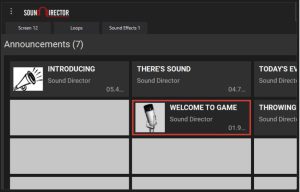 Sound Director software is designed to enhance the fan experience while eliminating the hassles traditionally associated with providing in-game entertainment using IPads, streaming services or any other clumsy style medium.
Sound Director software provides instant access to your entire fan entertainment package, including quality music and sound effects. All this from your own computer, all at an incredibly affordable price!
Take command of your game! Join the ranks of the over 2,500 professional and academic sports teams & organizations that are currently using Sound Director.
Sound Director Highlights:
1. Expandable Media Players with Effects & Visualization
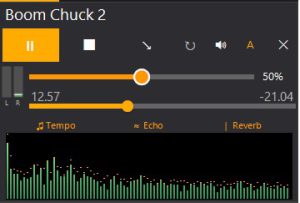
We’ve taken our traditional media players and put them on steroids. Now you have some serious audio effects available on the fly at your fingertips like Echo, Delay, Reverb, Feedback, Tempo, Pitch and more. Speed up or slow down the tempo of any song without changing the pitch. This opens up a whole new set of outrageous possibilities . . . Plus, not only have we added VU meters on each and every media player, but we’ve even added a visualization of the sound form with just a click of the mouse.
2. Audio Editor
Our upgraded built-in audio editor gives you a ton of flexibility including a full set of editing tools; Compressor, Expander Delay, Flang, Time/Pitch, Filters, Amplify, Fade in & out, etc.
3. Tabs provide much more flexibility
Another very popular feature in Sound Director are the Tabs. We’ve put them on 3 areas of Sound Director. First, we’ve added them to the media palette above each screen. This allows the user to have quick access to those screens that they want access to more often each game.
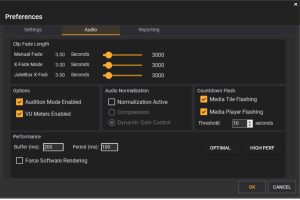
Second, we’ve added them above the media players. You can now drag multiple selections to each tab and literally script out your entire game presentation! The third area we’ve added tabs is towards the bottom of the interface. Think of them as a whole new set of unlimited screens. Each tab there can contain as many screens as you want.
Having multiple tabs provides more visibility and game day efficiency, allowing the user to quickly navigate as well as have many selections available for game situations.
4. Intelliclips
Sound Director keeps one of your favorite and most useful features in Intelliclips providing multiple selections on one button. But again Sound Director makes it even better.
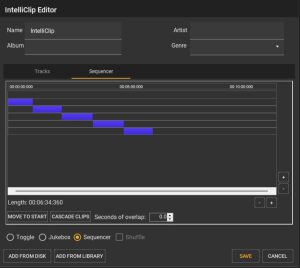
Intelliclips now show the total time of the audio clips making it much easier to script out pregame mixes, delays, etc.
5. Normalize your Output
One of the most requested features you asked for was a way to have consistent volume levels going out to your PA, even with songs recorded at low levels. We’ve done it with one simple button. Just click on the Normalize button and instantly everything going out is the same volume.
We have three levels of Sound Director to choose from:
- Sound Director Premium – Our fully featured “top of the line” version. This version has everything you’ll need to have a fully professional audio presentation.
- Sound Director Standard – This version has many features that will help you with having a very solid audio presentation. This version is very popular with schools throughout North America.
- Sound Director Express – This version allows access to the most basic features of Sound Director. The Express version may be useful for some non-profits or schools just beginning to enhance their event presentation. For a small investment Sound Director Express will give you all the latest advancements in-game presentation software.
All Versions:
- Support .mp3, .mp4, .m4a, .wma, .wav, .ogg, & .flac file types
- Windows 10 & 11 Compatible
- Free Technical Support
Look What Others Are Saying About Sound Director
“A really great software package; very easy to learn and use – everything is only a click away!”
Nathan Taylor
Athletic Dept. Virginia Military Institute